


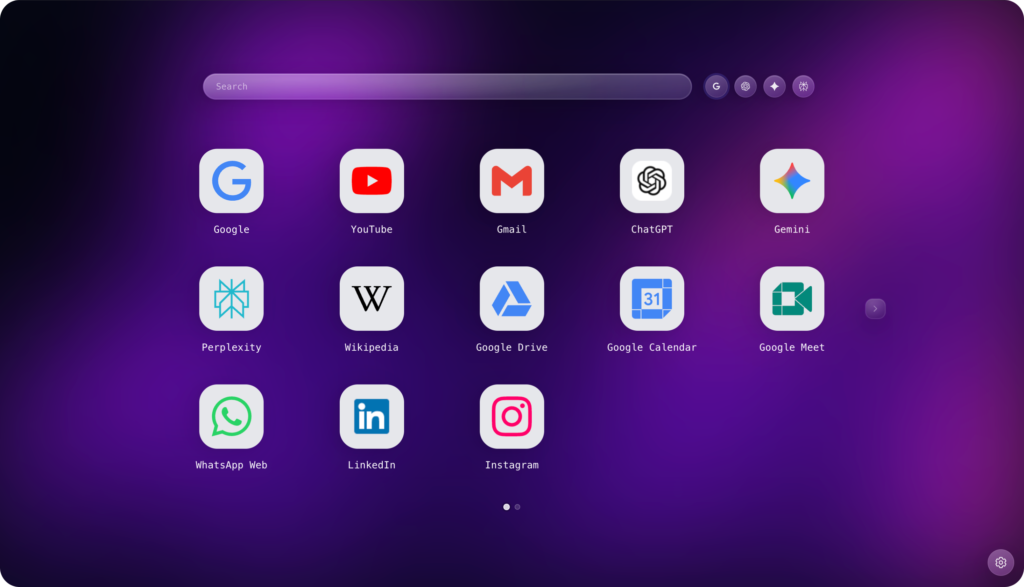
A stunning, customizable dashboard featuring smart shortcut folders, multi-engine AI search, and a floating search bar for ultimate speed.



Radial New Tab is a productivity extension that replaces your default “New Tab” page with a modern, fully customizable dashboard.
It features a smart shortcut grid with folders, beautiful wallpapers, and integrated AI search tools to help you browse faster.
Yes! You can choose from our stunning preset collection or upload your own images.
You also have full control over the look, adjust blur, brightness, zoom, and tint to make your text easy to read and your background pop.
Organizing is easy. simply drag and drop one shortcut icon onto another to create a folder instantly. This helps keep your dashboard clean and clutter-free while keeping all your favorite sites accessible.
The “Temporary Chat” feature allows you to open ChatGPT or Google Gemini in a fresh, temporary session. This is perfect when you want a clean context for a new query or improved privacy without cluttering your main chat history.
You don’t need to open a new tab to search! Just use the configured keyboard shortcut, and a compact search bar will appear over your current website. You can type your query and choose to open results in a new tab.
We prioritize privacy and speed, so all your data is stored locally on your device rather than in the cloud. However, you can easily back up or transfer your setup using our Import & Export feature. Simply “Export” your settings to a file and “Import” them on another computer to restore your layout instantly.
Yes, Radial New Tab comes with default shortcuts for focusing the search bar and toggling the Floating Search, but you can customize these in the extension settings to fit your workflow.
Yes, Radial New Tab is free to download and use on Chrome, Edge, and Firefox.
Whether it’s a brilliant suggestion for a new feature or a weird glitch, we want to hear it. Your feedback is what makes Radial New Tab better for everyone.